
› Forums › Geocaching in Wisconsin › Help › Mapping for open cache locations
- This topic has 20 replies, 10 voices, and was last updated 17 years, 3 months ago by
GetMeOutdoors.
-
AuthorPosts
-
10/07/2008 at 8:55 pm #1727187
Hi, everybody. I’ve been toying around with some stuff I’m sure others have already figured out. I’m trying to plot out areas that are/aren’t available to place new cache hides… basically by drawing a .10 mile diameter circle around locations where caches are. I know that’s not a perfect system because of multi and puzzle caches, but I’m not worried about that. Then, whatever is outside these circles is potentially available. Has anyone figured out a good way to do something like that?
The best I’ve been able to come up with is an image overlay in google earth but that’s very cumbersome.
Thanks for the help 🙂
10/07/2008 at 9:35 pm #1896780GMO, What type of GPSr and map program are you using?
With my Garmin and Topo program, I can set up .10 radius from a waypoint. I used it to help ne set up some caches. It might not be exact, but will get ya real close.10/07/2008 at 11:10 pm #1896781@cheezehead wrote:
GMO, What type of GPSr and map program are you using?
With my Garmin and Topo program, I can set up .10 radius from a waypoint. I used it to help ne set up some caches. It might not be exact, but will get ya real close.He doesn’t have a Garmin…. hence the problems. 😉
10/08/2008 at 12:05 am #1896782Ahhh……poor,poor fellow…… 😥 😥 😥 😕 😕 🙄 😉
10/08/2008 at 12:46 am #1896783Since you don’t have a Garmin you only have 2 options.
1. Find a map program of your choice. But make sure that you can tweak the scale. Then you need to input all the caches in the area that you wish to place a cache. Print the area that you would be placing the cache. Place a dime on each cache, and trace a line around the dime. Move dime to next waypoint and trace again. Continue until all waypoints have a circle. Areas not in the circle should be OK but you might want to ask someone with a Garmin to be sure.
2. Go buy a Garmin.
10/08/2008 at 1:20 am #1896784Although I’m not terribly happy with my Delorme GPS for geocaching, Delorme has, arguably, the best mapping software available. I’ll play around and see how easy/difficult this would be. How big of an area are you thinking about?
10/08/2008 at 12:15 pm #1896785I have a Garmin, but ………
I download waypoints to MS Streets & Trips, and draw circles around them. Can easily see where the possibilities are for new caches.
I recently used this method to map out Simpson #9 (?) along the Fox River.
I keep track of all the final waypoints for puzzles in the Kingdom, since there are so many. That way I can map them out if need be.
10/08/2008 at 12:58 pm #189678610/08/2008 at 2:43 pm #1896787Yeah, that would be a great commercial! 🙄 What program would that sponsor? “Lost”?
I’m actually looking for something like marc’s response using Streets and Trips… except I also want to use satellite images on the overlay. I have an older version of S&T but that is not a feature on that one.
I don’t have a specific area in mind really… just something I’ve been playing around with. I could have used it for the last couple caches I placed and the s|s one in downtown Wausau. I’d really like to be able to do it in Google Earth, but it seems to be lacking some basic scaleable drawing tools. Even the image overlay is a pain because you can’t lock the proportion when you resize.
Mathman is right.. no Garmin. I have a Magellan Explorist. Is it ok if I still post to the forums or do I have to withdraw my WGA membership? 🙄
10/08/2008 at 3:40 pm #1896788I highly recommend ExpertGPS. It is not free (or even real cheap), but nothing does the job it does, that I have found so far.
You can enter OR download waypoints, import GPX or LOC files, or whatever, to get waypoints in there.
Then, just draw proximity circles of .1 miles around the waypoints.
ExpertGPS has both satellite and topo map overlays.
Very, very useful program.
On the Left Side of the Road...10/08/2008 at 5:08 pm #1896789It looks like you have the .1 mile thing down pretty well, GMO. 🙂
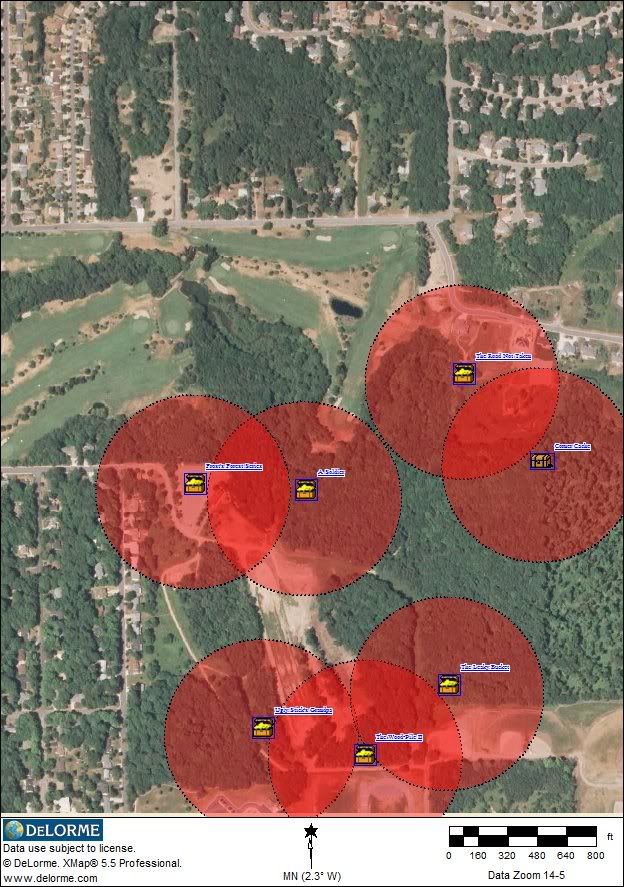 10/08/2008 at 5:38 pm #1896790
Hey, that’s cool, cat! Yeah, I knew those were wedged in there pretty tight because I measured with he GPS in the field. It would be nice to do it at the desk 🙂
I’ll look into that ExpertGps thing.. sounds interesting.
Cat, does that delorme software sell separately or just with the GPS?
10/08/2008 at 6:44 pm #1896791There is also a macro called KMLcircles for GSAK that does this exact same thing. It appears to just create the circles, but you can KML caches too – So I played with this for a couple minutes, but seems to work nice into Google Earth.
10/08/2008 at 6:47 pm #1896792Yes, GMO. All the software is available seperatly.
I’m going to look at the GSAK macro that Abby’s Family suggested. That sounds even easier.10/08/2008 at 6:56 pm #1896793The GSAK macro works slick! You don’t have the option for overlaying the map you want, but it’s quick and easy.
-
AuthorPosts


- You must be logged in to reply to this topic.