
› Forums › Geocaching in Wisconsin › Tech Talk › Geocaching App for the droid
- This topic has 35 replies, 14 voices, and was last updated 14 years, 8 months ago by
wout.
-
AuthorPosts
-
02/24/2011 at 4:01 am #1943532
I’m not an Android user so I obviously don’t have the app. From a programmers perspective though it would be very easy to flip the tide though on their forums.
Scenario 1 – They know who the posters on the site are. If I post something related to c:geo they could easily email me with a statement stating the c:geo violates the TOS based xyz.
Scenario 2 – Everytime someone posts something c:geo related they could automatically add a post stating the c:geo TOS violations.It call all be strictly informational, but it would certainly address the “I didn’t know” and would definately be there if you were searching the forums for information. This doesn’t necessarily catch everyone because a user of the app may never post anything in the forums.
It also makes me wonder about a macro I was just looking at in GSAK that is a scraper. Addlogs.gsk lets you “scrape” all logs for caches that you own (could be modified I believe to remove the “owned” requirement). I just looked at this again and there isn’t anything in the macro code that says if this is GC approved.
I’m certainly not trying to start an argument, but just citing a couple of examples where it’s unclear if the actions are GC approved or not.
02/24/2011 at 6:57 am #1943533That particular macro has been intentionally hobbled by the authors numerous times. It used to be able to get logs from any cache, but that functionality was disabled in January, 2010. I’m not aware of any bans from using this macro, but the GSAK guys are concerned enough about it to take some drastic steps to make sure it isn’t abused.
A similar macro named RefreshAll performed a similar function, but with less restrictions. Using that macro did result in bans, and GC asked GSAK to make it unavailable.
I probably shouldn’t have suggested that c:Geo not be discussed here. What I should have said it that we probably shouldn’t be advocating the use of an application that violates GC’s terms of use. Even that is just my opinion and not necessarily the opinion of the BOD.
02/24/2011 at 5:36 pm #1943534I’m not a programmer. Why can’t groundspeak block access by a particular app? I have read they know if you are using it. I don’t know if that’s true but if so why not just block?
On the Left Side of the Road...02/24/2011 at 6:24 pm #1943535Actually they did block the access sort of. What you are seeing is what is typical of most illegal access situations in publicly accessible websites. The website blocks access for a particular account or method, only to have the intruder switch to a different access method. Kind of like killing roaches one at a time. You stomp one and three more come out of the woodwork.
In my opinion, Groundspeak should probably sue the various “Android Market”s to stop them from distributing this, but they didn’t ask my opinion. This would at least stop it from being used and updated by casual users. I do know that some of the methods c:geo used to grab data in prior versions were particularly taxing on the Groundspeak servers (such as downloading the entire cache database for EACH user), but they have since made it somewhat less obnoxious (but no less illegal).
02/24/2011 at 6:51 pm #1943536Actually the “scraping” is pretty easy to do. Basically given a list of GC numbers (which can also be scraped using a similar method as described) it’s just a matter of “reading” web pages. A web page is nothing more than text formatted with some well defined delimiters. The GC.com page format is also very stable and well known / defined. Based on this a program requests a web page for a GC number (note – the program does not have to be a web browser but can be any web enabled application) and then “reads” the content. It easily picks out the coordinates, attributes, etc. to store in it’s local database. The program can do this extremely fast in comparison to a user manually going to each page and doing a GPX download (or similar).
The challenge is that it’s not easy to differentiate on the webserver side what the application is (at least in my server side programming days it wasn’t easy). GC.com knows the user because you have to be logged in to get the coordinates. Another “spoofing” technique is to automate the browser to download the page and then the application reads the file locally (in this case the “requestor” is the browser and not the application).
Part of GC.com’s challenge is when to push the block. Considering the legal issues surrounding these types of things, many companies choose to let things continue until official litigation is complete before imposing a “block”. Blocking prematurely could backfire and allow GC.com to be sued for not making the information available.
02/24/2011 at 7:20 pm #1943537@CodeJunkie wrote:
The GC.com page format is also very stable and well known / defined.
Not really. While they may “look” the same, the underlying page structure changes relatively frequently.
02/24/2011 at 7:24 pm #1943538@Team Black-Cat wrote:
@CodeJunkie wrote:
The GC.com page format is also very stable and well known / defined.
Not really. While they may “look” the same, the underlying page structure changes relatively frequently.
This is why Greasemonkey stuff breaks after just about every site update which is monthly. The site used to be much more stable but recently they’ve changed a lot.
Coincidental?
02/24/2011 at 7:42 pm #1943539@Team Black-Cat wrote:
@CodeJunkie wrote:
The GC.com page format is also very stable and well known / defined.
Not really. While they may “look” the same, the underlying page structure changes relatively frequently.
I was thinking of it a little differently. I was thinking along the lines of cache to cache at a fixed point in time.
You are correct that the page format does change periodically as you noted. As long as the “scraper” keeps up with the format changes it can easily “scrape” a lot of pages in a very short time period.
02/24/2011 at 9:55 pm #1943540I’m no layer but I suspect that c:Geo MAY violate Groundspeak TOU policies but not any laws. Besides, if someone already pays for the information what difference does it make how they access that information?
02/24/2011 at 11:01 pm #1943541Well, here’s my thought. As a user, I can go onto the geocaching.com site and do a search based on caches near my location. It pulls back pages and pages of info.
When I use c geo it provides my location then displays the results on a map or list. When I click the map or list, it pulls up the cache page in a regular browser window because that’s what I select as the default.
I continue to struggle to see how this violates the TOS. Supposedly it does but I don’t have an official word how. Because to me on the outside, it looks to be a simple integration service that takes the information that I can obtain via the phones web browser-a list of caches and coordinates-displays them in an easy to digest, map format, then lets me click through to a regular web page to see the actual cache.
I don’t see where the “scraping” is being done. Help me out here.
And even so, I am the end user, using information that I pay to use, and using it for only my own purposes, not to repurpose and sell.
On the Left Side of the Road...02/24/2011 at 11:33 pm #1943542I noticed that a couple weeks ago that C:Geo ceased providing the cache names in the list of caches, and instead just provides the much less helpful GC number.
Is this because I unknowingly hit a preference switch somewhere, or is it because groundspeak is limiting what information can be picked up by C:Geo?
thanks
z
02/25/2011 at 12:59 am #1943543@gotta run wrote:
I don’t see where the “scraping” is being done. Help me out here.
I’m not a c:geo user so I can’t give a better explanation nor do I have any specific info on the “Terms” that are being violated (and I really don’t care to be honest). As a developer I do find this interesting however because software / data is so fuzzy from a legal standpoint. My example above is simply a basic explanation of how “scraping” is done using a geocaching example that should be familiar to most of us.
This is definately a gray area though and exactly why I made the point about GSAK earlier also. Gotta Run you make a great point regarding the user’s perspective. If you’re BUYING a piece of software sold in a “market” then you should be able to assume that what you’re doing is perfectly legal and legitimate. This is a far cry different from duplicating CD’s, DVD’s, etc. which is are obvious copyright infringements.
I also find it fascinating from the programmer’s perspective that one of the competitive sites is actually providing an API (application programming interface) to provide a structured method to access data (i.e. no “scraping” required). In my opinion, it would be interesting to see GC.com embrace the API model and make the data available. Providing a great API could open the doors for some great 3rd party applications and provide an even larger customer base. It’s the old “seeing the forest through the trees” scenario where they aren’t looking forward enough or seeing the needs of their customers.
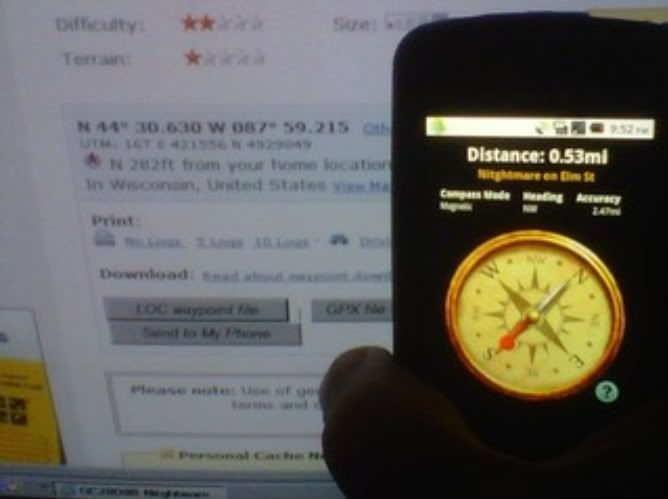
02/25/2011 at 3:14 am #1943544ok ok ok really were getting off the track of why i posted this thread really i just need help stop with everything and help..
If you look at the distance on the phone and my computer you can clearly see there is a big differance. I do have the gps turned on, on my phone so im kinda stuck on what to do.also the accuracy is way off it says 2.43 miles. THIS IS THE GROUNDSPEAK APP.
 02/25/2011 at 11:21 am #1943545
Perhaps you have your GC home location set somewhere other than your house.
02/25/2011 at 1:15 pm #1943546Assuming the last post isn’t correct, you need to understand that the GPS in your phone is NOT responsive like the one is a standard handheld unit. While a handheld will settle down in a few seconds, phones are more like car units, which take more like 2 minutes to center in. Additionally, your phone will not be at all accurate inside a building. The antenna is not good enough to work inside, so the phone will use its backup methods, such as cell tower triangulation or Wi-Fi network address.
But, if you go outside with both a phone and a handheld and you don’t get similar readings with both units, the GPS in your phone is probably broken.
-
AuthorPosts


- You must be logged in to reply to this topic.