
› Forums › Archived Forums › Old General Forum (Busted) › Map of finds
- This topic has 20 replies, 16 voices, and was last updated 21 years, 8 months ago by
Green Bay Paddlers.
-
AuthorPosts
-
01/22/2004 at 9:24 pm #1721255
Wondering if anyone else saw this in the general gc.com fourms. (I just looked for it again and could not find it. Maybe it was deleted.) It’s a nifty way to create a map of your finds. Here’s how:
You’ll need to be a premium member of geocaching.com. Make a new pocket query (call it “finds” or whatever). Select 500 caches (if you have more than 500 finds you’ll have to do more than one pocket query). Select each type of cache except locationless (these will show up in strange places on your map if you do), but don’t select “all types” or it will include locationless automatically. Select “that I have found” and select States/Provinces. Scroll down to US:Alabama and click on it. Scroll to the bottom, press your “shift” key and click on US:Wyoming. All states should now be colored blue. (If you have more than 500 finds, select fewer states for each PQ) Leave the other settings as “none” and choose to output in GPX format. Zipped files work best and don’t trigger virus software (some email providers don’t like GPX extensions). Choose the current day of the week and then submit your PQ.
When it shows up in your inbox, download it and run it through Spinner. Go to Keenpeople.com’s GPX Maptool. If you’re not a member yet, sign up. Select your GPX file (the one now labeled spinner.gpx) 640×480 resolution and center your map at 35 lat and -98 long in order to show the lower 48. (Sorry, this won’t work for outside of the US) Click on “create map.”
To post the map here, you’ll need to upload it from your My Cache Page or have your picture hosted somewhere else. Put the IMG link in your post and you’re done.Here’s mine:
 01/23/2004 at 12:12 am #1746758
Now that’s way cool.
01/23/2004 at 6:00 am #1746759Awesome
[This message has been edited by MR Andersen (edited 01-23-2004).]
[This message has been edited by MR Andersen (edited 01-23-2004).]
[This message has been edited by MR Andersen (edited 01-23-2004).]
01/25/2004 at 9:06 pm #1746760Use the same file(s) as input to GPS Visualizer to get a large selection of map types.
01/25/2004 at 9:49 pm #1746761Here’s an attempt to map mine.. only retrieved 1473 caches but it should give an idea of my travels

[This message has been edited by The Lil Otter (edited 01-25-2004).]
01/26/2004 at 4:23 am #1746762Oops, Lorrie I edited your post above and fixed it too well. The ubb code for a image is the following (remove the ” from the code, I put it there so it won’t work)
““
01/26/2004 at 6:47 am #1746763This is sad compared to the others but who cares!
===
PWB – Comet Cache Chasers
http://www.cachechasers.com01/26/2004 at 1:34 pm #1746764Looks like I need to start heading westward a bit…
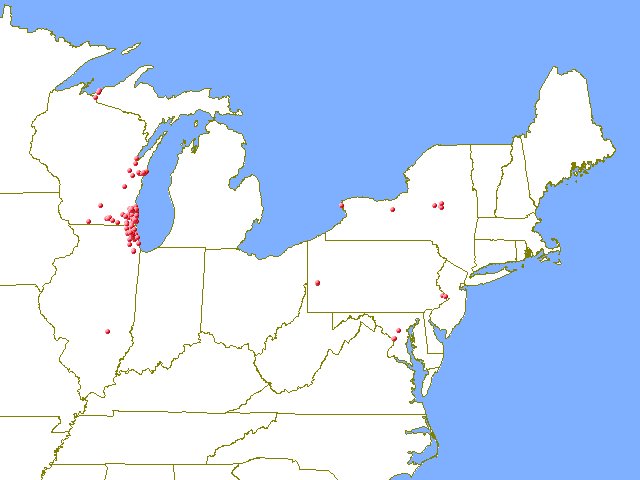 01/27/2004 at 6:56 am #1746765
I finally figured it out. The blip in West Virginia is actually a traditional cache with a locationless cache the 100,000 mile rest stop. I actually logged it in my driveway when my 1994 Chevy Astro hit 100,000 miles. If I ever make it to West Virginia I’ll try to get to the actual cache.

The only problem I see with this is that the gpx file doesn’t contain caches that have been archived, and the pocket query generator doesn’t allow you to select archived caches. If caches are archived after your first query you can merge the data from your first query with a new one to show any that have been archived in the time between queries. Of course this still means your map won’t show any that were archived before your first query.Edit 1/27: I guess I’m not the only person looking to have PQs search for archived found caches. http://forums.groundspeak.com/GC/index.php?showtopic=62991
[This message has been edited by QwertyToo (edited 01-27-2004).]
[This message has been edited by QwertyToo (edited 01-27-2004).]
01/28/2004 at 4:29 am #1746766Ok, this is embarrassing…..but remember everyone had to start somewhere…..
 01/29/2004 at 12:44 am #1746767
Can someone explain what Spinner is?
Thanks
01/30/2004 at 6:39 pm #1746768My non-archived finds and creations.
I used GPS Visualizer that accepts/merges the GPX files without requiring Spinner.
 02/11/2004 at 3:12 am #1746769
Finally got it working! This is cool!
[This message has been edited by Cashing Out (edited 02-10-2004).]
03/19/2004 at 3:57 pm #1746770Alright, I must be dense, because I have tried bunches of settings but I’m always looking from a High earth orbit.. I can’t get zoomed in like Caching out’s regional map. Can someone show me the advanced and regular settings so I can be just like them???
Tony
03/20/2004 at 5:23 am #1746771When creating your map, you have the options of centering it at a specific lat. & long. Also you can display it a specified number of degrees high and wide. I played with different settings until I got the coverage I wanted.
Bob -
AuthorPosts


- The forum ‘Old General Forum (Busted)’ is closed to new topics and replies.