

Forum Replies Created
-
AuthorPosts
-
My wife the kid and myself. But dont know will kinda be flying by the seat of my pants it all depends on if I have tou go to Shawano to buy a Ice shake but then can cache in shawano
Wtg on the 1300
@Lostby7 wrote:
@sandman4182 wrote:
The Wife has a Lg Optimus (android) and I had to turn it off for a few seconds and then turn it back on and it set it self.
Yep, that’s the one I have as well…really lame. I found some discussions on this phone and tons of folks had to do a restart to get the time to update…… 🙄
Which I dont think you should have to shut down your phone to update your time My Blackberry set the time all by itself last nigt or this morning. Even my alarm clock set the time by itself hehe.. But glad its set right now
The Wife has a Lg Optimus (android) and I had to turn it off for a few seconds and then turn it back on and it set it self.
That was a good artical I always enjoy a reading about caching in the news
Im up fpr helping if there is still room
Congrats
Yeah I would totaly buy one or two
03/10/2011 at 8:58 pm in reply to: Congratulations to DrHaas on hitting the big 20K smileys #1944423Wow Wtg congrats on the 20k
So far the new site looks great WTG
I fixed my problem guys thanks for helping.. I also posted a question o the groundspeak forum also and got the answer i needed..
I looked at my google maps on my phone and it was way off, so i updated the google maps and then checked my postion again and bingo it was on point. Then I opened the groundspeak caching app and checked the distance to the cache I placed by my house and bingo it was very close to what my computer said so im all go to cache thanks for the help everyone.. 😀 🙂 😆 😉
ok ok ok really were getting off the track of why i posted this thread really i just need help stop with everything and help..
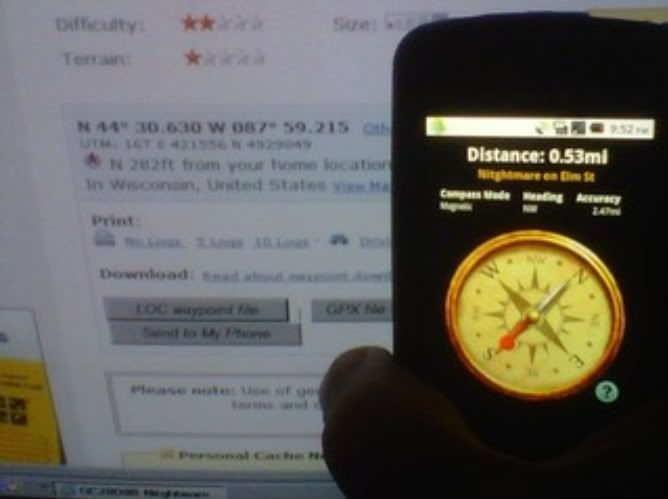
If you look at the distance on the phone and my computer you can clearly see there is a big differance. I do have the gps turned on, on my phone so im kinda stuck on what to do.also the accuracy is way off it says 2.43 miles. THIS IS THE GROUNDSPEAK APP.
@The Yinnie’s wrote:
Team_Sandman
Who do you have for your service?
ThanksWe have Sprint
Thanks Frmr I think that might be the problem now I just have to figure out how to turn it on
Can anyone tell me how to calibrate the compass for either the C:geo or the Groundspeak caching app please..
I checked how accurate both apps were and they were both off I place cache down the road from my house and I pulled that cache up on both apps and the groundspeak app sait it was .58 miles from my house with a accuracy of 2.33 miles theres no thats right my oregon 550 says its 250ft from my house. and the c:geo app says its .60 miles. well I guess that kinda god that there close but yeah. Even when I walked to the cache the distance didnt even moveit stayed the same on both apps. HELP.
Im glad I dont have this problem with my blackberry trimble app I love that app
-
AuthorPosts
